
chordiology blog
Chordiology sang for the Saturday night show at COTS this past weekend (we’ll put up a blog entry on it soon), and one of the things we were asked to talk about was how we learn new songs and rehearse. At first, I didn’t think we probably did anything terribly different from anyone else, but as I thought about it, I did realize that we’re doing some things that maybe not everyone else is doing, and it might benefit people to hear about it, in case they might find it useful.
Many quartets and choruses use Learning Tapes or CD’s to help them learn a song. We’ve been doing that for years now, ourselves. We especially love any Learning CD put out by Tim Waurick <http://www.timtracks.com>, and we think we’ve learned to sing better -- not just learned the notes -- by listening to Tim sing and trying to match him. Nearly all of the learning tracks available through the Music Premiere series (available through the Society) over the last couple of years have been produced by Tim, in addition to the tracks available through his website.
But there are a couple of more “geeky” things we’re doing that I think you might be interested in.
Audacity
One thing we’ve been doing the last couple of years is using audio recording outside of our rehearsals to allow us to learn our parts more thoroughly. Recording software allows us to individually record ourselves singing along with a learning track, and then we send those recordings around to each other for comments. We use an application called “Audacity” <http://audacity.sourceforge.net> to do this, but nearly any audio editing application can do the trick, as long as it can play and record at the same time. We like Audacity because it’s FREE and works on Mac and on Windows. It does a lot of things, but we really just use it for recording.
You need to have a microphone that you can hook up to your computer (either through the Line In port, or if you’re really fancy you can buy a USB microphone), and some headphones so you can hear what’s being played without playing it over your computer speakers (where it might get picked up by your microphone). Paul uses a nifty USB headphone/mic set. Open the learning track in Audacity, press “R” to start recording. It will play the learning track and you can sing along and record yourself. Press the space bar to stop recording. You can play around with switching the Left/Right balance so you can hear yourself singing with the trio, or singing along with just your voice part. The latter is a really good way to see how well you’ve learned your part -- are you singing all those pitches just like the guy on the learning track? For me, this is equal parts “immensely valuable” and “exceptionally depressing”.
Paul will sometimes record himself singing a song with the interp he wants us to use. Then he emails it to all of us and we can sing along to learn it. If we want, we can even take turns adding our part and sending it to the next guy until we have a four-part recording of a song we’ve never even sung together! If you have learning tracks for each of the four parts, then you can practice duetting with the other parts outside of rehearsal.
Many good tutorials for Audacity are available from the Audacity web site, but here’s a good one to get you started with recording: <http://www.guidesandtutorials.com/audacity-tutorial.html>.
“The Truth Machine”
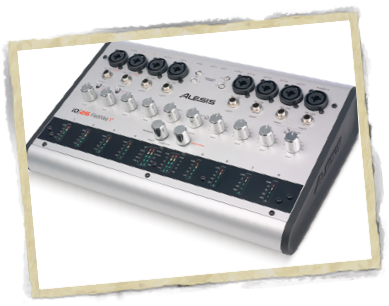
We use Audacity outside of rehearsals to learn our parts and to get feedback from the other guys on how we’re singing. During quartet rehearsal, too, we’re recording ourselves fairly regularly. To do this, we purchased an audio interface device that lets us connect up to eight microphones (yes, we only use four) and send the signal into a computer where we use audio recording software to capture each channel (each microphone) separately. Then we can play it back as many times as we’d like, listening to all four parts together, or dropping out one or more of the parts to isolate individual voice parts to find where we’re having problems.
This is by far one of the most useful things we’ve started doing in the last few years. So many times in the past, we have been practicing a tune and thought, “There’s something wrong with that chord”, but we just couldn't figure out what it is. Recording this way lets us go back and really examine a section, down to individual voice parts, and see where the trouble is. At the end of a rehearsal, we can email the good recordings to the group.
It’s another one of those “valuable depressing” things. Every scooped interval, flat pitch, and flubbed word is right there, crystal clear and waiting for each of your buddies to hear. No matter how well you think you sang it, there’s gonna be something embarrassing in there, I guarantee. At one of our rehearsals this summer, we were getting a little goofy and slap-happy over some of the things we were finding in our recordings, and the entire rehearsal came to a rollicking, laughing collapse when we replayed a part where one guy muffed some words which came out as “I water myself”... It was at least twenty minutes before any of us could compose ourselves long enough to sing a single chord. For ten bucks, I’ll tell you who it was. For twenty bucks, Cliff, I won’t tell them it was you...
The device we purchased is an Alesis iO|26 (pictured above). As I mentioned, it has eight microphone inputs (XLR or Phono), and connects to your computer via a FireWire cable. Looking at the Alesis web site now, it does appear they also have a similar device with only four inputs (the iO|14), which would probably work for a quartet and would be cheaper than what we got -- it costs about $200. As an added bonus, both devices have MIDI jacks so you can connect a MIDI keyboard to a computer to use it with music notation software if you wish.
Any multi-track audio recording software will work with this device. Cubase LE is the application that comes with it (Mac and Windows). I already knew how to use GarageBand (Mac only), so that’s what we normally use during rehearsals. Unfortunately, as far as we can tell, Audacity doesn’t do simultaneous multi-track recording. We have four Shure Beta 58 mics, and mic stands. We plug speakers into the Speaker Out port on the computer, so we can listen to our recordings.
Recording ourselves -- individually outside of rehearsal, and as a group during rehearsal -- has improved our ability to find problem spots. Painful as it can be, hilarious as it can be, that’s what we do.
**************************************
If you're using Audacity to export MP3 files, you'll need to download this file to give it the ability to work with the MP3 format.

Sunday, January 6, 2008
the tyranny of the truth machine (rob)

the evil gizmo
It will expose our every miserable failing, but we love it anyway.

